
How to Create a High-Converting Chiropractic Landing Page
Your ads get clicks. Your phone stays quiet. A potential patient clicks your ad for sciatica relief, lands on your home page, sees a full service menu, a team bio and a blog feed, and leaves without booking. Usually the problem isn’t your ads or your settings. It’s the page the visitor lands on, and a focused chiropractic landing page often fixes it faster than a bigger ad budget.
Your main chiropractic website tells your story to everyone. A landing page has a narrower job: it turns one type of visitor into one booked appointment. This guide covers what to put on that page, what to leave off, how to build pages for PPC campaigns, and what a strong layout looks like.
TL;DR: A chiropractic landing page is a standalone page with one goal, usually getting a visitor to book a first visit. The pages that convert match what the visitor searched for, lead with a clear new patient offer, show real reviews, answer insurance and first visit questions, and make online scheduling or a phone call effortless. Build one page per campaign or condition, test it regularly, and keep everything else off it.
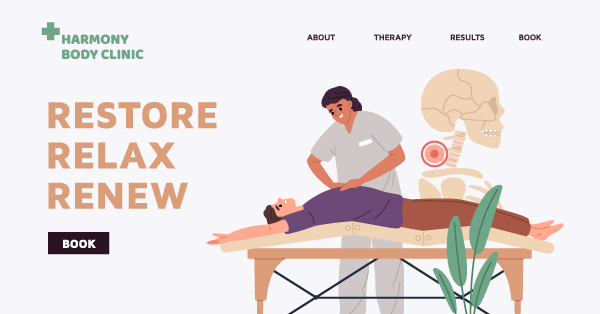
What Is a Chiropractic Landing Page?
A chiropractic landing page is a standalone landing page built around a single action, most often booking an appointment. It usually connects to one ad campaign, one condition or one offer, and it removes anything that pulls the visitor toward a different decision.
Each page gets its goal from the campaign behind it. Most chiropractic practices build landing pages around one of these actions:
- Book a first exam or appointment
- Claim a new patient offer
- Request a callback from the front desk
- Register for a workshop or join a newsletter list (a natural lead-in to chiropractic email marketing)
Most landing pages also limit or remove the main menu. Visitors can still find your phone number and address, but the page points them to one obvious next step instead of ten competing ones.
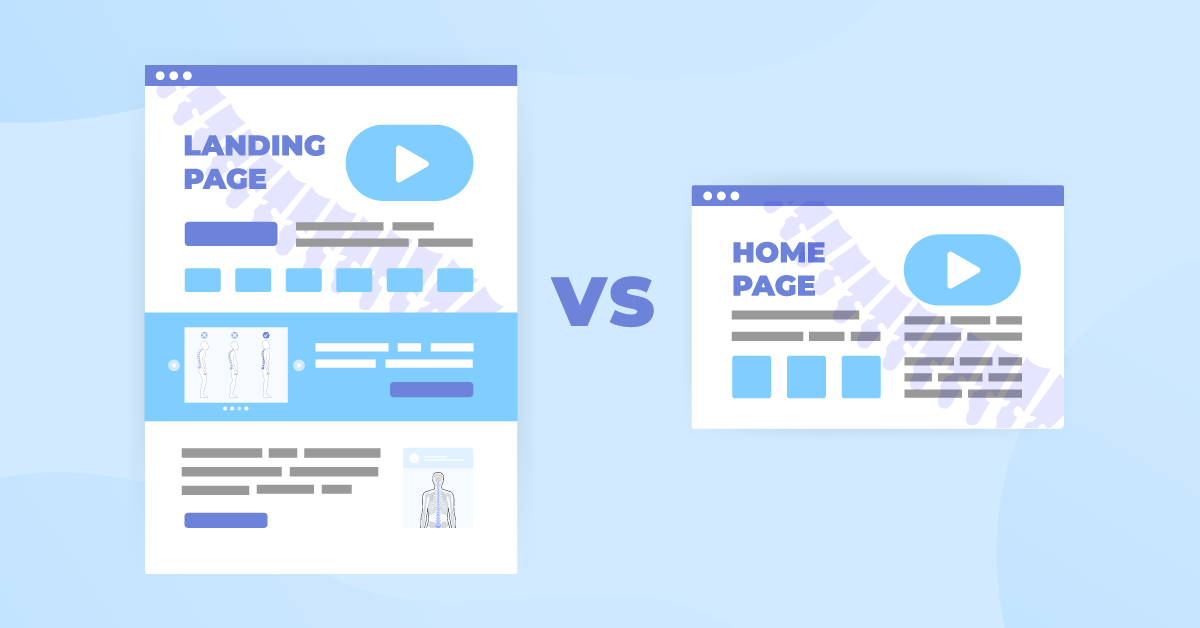
Landing Page vs. Home Page: What Your Chiropractic Website Needs
Do you need both? Yes, because they do different jobs. Your home page introduces the practice to everyone who arrives: new patients, current patients, referral partners and job applicants. A landing page speaks to one visitor with one need.
| Home page | Landing page | |
| Goal | Introduce the practice | Get one specific action |
| Audience | Every visitor | One type of visitor (for example, people searching for sciatica relief) |
| Navigation | Full menu | Minimal or none |
| Calls to action | Several | One, repeated down the page |
| Best traffic source | Direct, branded and general organic search | PPC, social ads, email campaigns and condition searches |
Picture a person who searches “sciatica chiropractor near me,” clicks an ad promising fast relief, and lands on a home page that never mentions sciatica. That visitor has to dig for proof that you can help, and most won’t bother. A dedicated page with a sciatica headline, a clear offer and a booking button keeps the promise the ad made.
Where Landing Pages Fit in Your Chiropractic Website Design
Landing pages work alongside your main site, not in place of it. Most practices end up with three kinds:
- Condition pages: back pain, sciatica, headaches, auto accident injuries
- Offer pages: a new patient special or a free consultation
- Campaign pages: one page for each Google Ads or Facebook campaign
Keep your logo, colors and photography consistent with the rest of the site so the visitor knows they’re in the right place. Strong chiropractic websites treat landing pages as part of the design system from day one, alongside the other must-have features for your chiropractic website.
Anatomy of a High-Converting Chiropractic Landing Page
The elements below show up again and again on pages that turn clicks into booked visits. You won’t need every one on every page, but the best performers use most of them.
1. Give the Page One Clear Goal
Every element on the page should support a single action. If the goal is booking a first exam, the visitor shouldn’t also see a newsletter sign-up, a product shop and links to six service pages.
Simplicity helps here. Generous white space, short sections and one repeated button keep attention on the decision you want the visitor to make. When a page asks for three different things, visitors often do none of them.

2. Write a Headline That Matches What the Visitor Searched
The headline has one job: confirm to the visitor that they’ve landed in the right place. A compelling landing page headline mirrors the ad or search term, names the problem and hints at the outcome.
Strong headline formulas for chiropractors pair a condition with a location or a benefit:
- “Back Pain Relief in [City]: Same Week Appointments Available”
- “Car Accident Injury Care in [City]” (pair this with your personal injury marketing campaigns)
- “Bounce Back From Your Sports Injury”
- “Say Goodbye to Back Pain and Hello to Relief”
Follow the headline with a one-line subheadline that explains how you help, such as “Gentle, evidence-based chiropractic care with a personalized treatment plan from your first visit.”
3. Put the Essentials Above the Fold
“Above the fold” means everything a visitor sees before scrolling. On a phone, that space is small, so prioritize ruthlessly. These items belong there:
- A clear headline and subheadline
- Your value proposition in one sentence
- The new patient offer
- A primary call to action button
- A clickable phone number
- Your star rating and review count
- A photo of the doctor
If a visitor reads only that first screen, they should know what you offer, why they should trust you and how to book.
4. Lead With a Clear New Patient Offer
“Contact us” is an instruction, not an offer. A specific patient offer gives the visitor a reason to act today instead of next month.
Common offers include a discounted first exam with X-rays if needed, a free consultation, or a free insurance benefits check. Spell out exactly what’s included, how long it takes and any limits. Vague offers create doubt, and specific offers create bookings.
One caution before you publish any discount: check your state board rules and your payer contracts. Some insurers and federal programs restrict how practices advertise free or discounted services, so confirm the terms with your compliance resource first.
5. Write Body Copy in Your Patients’ Language
Good landing page copy sounds like your patients, not like a textbook. Pull phrases from intake forms, phone calls and reviews. Patients rarely say “subluxation.” They say “I can’t turn my head when I drive” or “my lower back locks up when I pick up my kids.”
Keep the copy focused on outcomes and the booking process. Add a short “Conditions we treat” list with four to six items and a one-line description of each so visitors can scan for their own pain point. Save the deeper education for your blog, where visitors who want to explore chiropractic care in detail can find it.

6. Add Reviews, Social Proof and Trust Signals
People check reviews before they book with a provider. BrightLocal’s Local Consumer Review Survey 2025 found that just 4% of consumers never read online reviews for local businesses, which means nearly every visitor to your page has review expectations.
Show that proof where visitors will see it:
- Your Google star rating and total review count near the top
- Two or three short testimonials that name a specific condition, such as headaches or sciatica
- Years in practice, credentials and professional association memberships
- Logos for the insurance plans you accept
Get written permission before you publish any patient name, photo or story. HIPAA rules require authorization before a practice uses patient information in its marketing, and a signed release protects both your patients and your clinic.

7. Use Real, High-Quality Images
Stock photos of smiling models look like every other chiropractic clinic online. Real photos of you, your team and your treatment rooms show visitors exactly who they’ll meet and where they’ll go.
A short welcome video from the doctor works well too. If you use before and after images, get patient consent first and avoid any suggestion of guaranteed results. Compress every image before upload so it doesn’t slow the page down.
8. Answer “What Happens on My First Visit?”
New patients often feel nervous before a first adjustment. A short walkthrough removes the mystery:
- Consultation: You talk through symptoms, history and goals.
- Exam: The doctor checks posture, range of motion and nerve function.
- X-rays, if needed: Imaging happens only when the exam calls for it.
- Treatment plan: The doctor explains findings and recommends a plan.
- First adjustment: Treatment often starts the same day.
Add an estimate of how long the visit takes. That one detail answers a question many visitors have but rarely ask.
9. Be Upfront About Insurance and Payment
Cost uncertainty stops a lot of bookings. List the insurance networks you accept, offer a free benefits check, and state your cash price for a first visit if you have one. Mention payment plans or care packages if your practice offers them.
Clear payment information also filters out leads who can’t move forward, so your front desk spends time on people ready to book.
10. Make Booking Easy With Online Scheduling and Click to Call
Patients expect 24/7 access to booking. Give them more than one way to act:
- Online scheduling widget: Visitors pick a time without calling. This works well after hours.
- Short form: Ask for three or four fields at most: name, phone, email and the reason for the visit.
- Click to call: A tappable phone number serves mobile visitors, older patients and anyone in acute pain who wants to talk to a person.
Repeat the booking button at the top, middle and bottom of the page, and add a sticky call or book button on mobile.
11. End With a Strong CTA (or Call to Value)
A CTA tells the visitor what to do next. A call to value goes a step further and tells them what they get for doing it. “Submit” is a CTA. “Book My First Visit” is better. “Claim My $X New Patient Exam” combines both.
For button design, focus on contrast and size rather than any single color. The button should stand out clearly from the background and be large enough to tap easily with a thumb. Effective button copy examples include:
- Call Now for Same Week Availability
- Book My Appointment
- Claim My New Patient Offer
- Check My Insurance Benefits
How to Create Chiropractic Landing Pages for PPC Campaigns
Pay per click ads work best when every campaign sends traffic to a page built specifically for it. Sending all your PPC clicks to the home page forces visitors to hunt for the offer they clicked on, and you pay for every visitor who gives up.
The fix is simple: create a custom landing page for each campaign or ad group. A back pain campaign gets a back pain page. An auto injury campaign gets an auto injury page.
Match the Ad to the Page
Message match means the ad and the landing page use the same keyword, offer and location. If the ad says “$X New Patient Exam in Austin,” the headline should say the same thing. Mismatched messages feel like a bait and switch, and visitors leave.
Improve Google Ads Landing Page Experience
Google uses landing page experience as one of the three components of Quality Score, alongside expected clickthrough rate and ad relevance. Google evaluates whether the page is relevant to the search, useful, easy to use on mobile, and transparent about your business.
A stronger landing page experience can help your ads earn better positions and lower costs over time. For a deeper look at campaign setup, read our guide to Google Ads for doctors and medical practices.
Track Every Lead
You can’t improve what you don’t measure. Set up conversion tracking for form submissions, online scheduling bookings and phone calls. Use a call tracking number on each landing page so you know which campaign drove each call, and record conversions in Google Analytics 4 and Google Ads. Solid tracking turns your chiropractic lead generation from guesswork into a system you can improve.
Optimize Your Landing Page for Mobile and Speed
Most local health searches happen on a phone, often when someone is in pain and wants answers right away. Design the mobile version first, then scale it up for desktop.
Keep buttons large and spaced apart, cut form fields to the minimum, and make sure the phone number dials with one tap. Limit pop-ups on mobile, because a pop-up that covers the screen can bury your offer.
Page speed matters just as much. Run your page through Google PageSpeed Insights, then compress images, remove unused scripts and avoid heavy sliders. A fast page keeps impatient visitors from bouncing before your headline loads.

Chiropractic Landing Page Templates: What a Good Layout Looks Like
Templates help you launch faster, but a template only provides the structure. You still need your own offer, photos, reviews and local details to make it work.
How do you choose between a template and a custom build? This comparison helps:
| Template | Custom-designed page | |
| Upfront cost | Low | Higher |
| Launch speed | Fast | Slower |
| Brand fit | Generic until customized | Matches your practice |
| Flexibility | Limited by the template | Built around your campaigns |
| Tracking setup | Often manual | Planned from the start |
Many practices start with templates for quick campaigns and move to custom pages for their highest-spend ads.
What to Leave Off Your Chiropractic Landing Page
What you remove matters as much as what you add. These elements quietly lower your conversion rate:
- The full navigation menu: It gives visitors an exit before they book.
- Your complete services list: A sciatica visitor doesn’t need to read about pediatric care on this page.
- Long practice history: Two sentences of credibility beat four paragraphs of backstory.
- Blog links and sidebars: They pull attention away from the offer.
- Multiple competing CTAs: One action, repeated, outperforms several different ones.
- Chat widgets that cover the booking button on mobile: Check how they display on a small screen.
- Broken links and expired offers: Review every live page before you send paid traffic to it.
Test and Improve Your Landing Pages
No landing page launches perfectly. Small, steady tests turn a decent page into a strong one.
Change one element at a time so you know what caused the result. Test in this order, starting with the changes most likely to move the needle:
- Headline and offer: These shape the first impression more than anything else.
- Review placement: Try your rating near the headline versus lower on the page.
- Booking method: Compare an online scheduling widget with a short form.
- Images: Compare a doctor portrait with a treatment room photo.
Let each test run until both versions have enough conversions to compare, then keep the winner and test the next element. Review results monthly in GA4 and Google Ads.

Turn More Clicks Into Chiropractic Patients With ChiroMatrix
A chiropractic landing page works best when it acts as the last step of a clear path: the ad makes a promise, the page keeps it, and booking takes seconds. When that path breaks, even well-funded chiropractic marketing campaigns produce low returns.
ChiroMatrix builds chiropractic websites and digital marketing programs for practices across the country, and our team has helped clients connect their ads, landing pages and online scheduling into one system that produces steady leads. If your current pages bring in traffic but few appointments, request special pricing or call us at 888.792.8384 to find out where your digital funnel is losing potential patients.
FAQs
What should a chiropractic landing page include?
A chiropractic landing page should include a headline that matches the visitor’s search, a clear new patient offer, a booking button, a tappable phone number, reviews, a short list of conditions treated, first visit details, and insurance information. Everything on the page should support one action, usually booking an appointment.
What is the difference between a landing page and a home page?
A home page introduces your whole practice to every visitor and offers many paths. A landing page focuses on one audience and one action, such as booking a sciatica consultation. Most chiropractic websites need both: the home page for general visitors and landing pages for ads and specific conditions.
How many landing pages does a chiropractic practice need?
Start with one landing page for each active ad campaign or major condition you treat. A practice running back pain, auto injury and new patient special campaigns needs at least three pages. Add more as you launch new campaigns or offers.
Should I use a template or a custom-designed landing page?
Templates work well for quick launches and small budgets. Custom pages fit your brand better and make tracking easier, which matters most for high-spend campaigns. Many practices start with templates and upgrade their best-performing campaigns to custom pages.
Can I add online scheduling to my chiropractic landing page?
Yes. Most scheduling platforms offer an embeddable widget you can place directly on the page. Online scheduling lets visitors book after hours without calling, so pair it with a click to call option for patients who prefer to talk to someone.
What is a good conversion rate for a chiropractic landing page?
It depends on your traffic source, offer and market. As one reference point, Unbounce’s 2021 Conversion Benchmark Report called anything above 3.6% a healthy rate for medical practitioners’ landing pages. Track your own baseline, then test to improve it.