
GMB Categories: A Complete Guide to Google Business Profile Categories
When someone nearby searches for a chiropractor or vet, Google decides which practices to show first, and your business category is the quiet signal that guides that choice. Every clinic on Google Business Profile shares its story through these categories, helping patients find the exact care they need.
For pet healthcare professionals, getting this detail right can be the difference between showing up for “pet grooming” or “veterinary care.” The right category attracts the right patients; the wrong one clutters your leads with mismatched searches.
This guide walks you through how to pick, refine, and monitor your Google Business categories with confidence so your practice appears in the searches that truly matter.

Why is GMB important?
Google uses categories to classify every business into specific service types such as Chiropractor, Veterinary Clinic, or Optometrist. These categories allow Google to organize local results and help patients find exactly what they need. For healthcare professionals, they act as digital identifiers that influence how your practice appears across search results.
The category you choose shapes how Google interprets your business. It determines your position on Google Maps, your chances of appearing in the Local 3-Pack, and the keywords that can trigger your listing. When your category matches your core service, your visibility improves, and the right patients are more likely to find you.
To understand their influence better, think about how each element connects:
- Local search rankings: Categories signal to Google what kind of searches you should appear in.
- Patient acquisition: The right choice connects you with users who are already looking for your services.
- Trust and credibility: Clear categorization reassures patients that they’re contacting the right professional.
The challenge arises when categories are chosen carelessly. A chiropractor listed under “Massage Therapist” might appear for unrelated searches, attracting visitors who were never looking for spinal care. This mismatch confuses patients, wastes advertising spend, and results in fewer conversions.
That’s why precision matters more than quantity. Adding extra, unrelated categories may seem like a shortcut to reach more people, but it often has the opposite effect. Google’s algorithm values intent alignment, not keyword stuffing. By choosing a single, well-matched category and relevant secondary ones, you make it easier for Google to recommend your practice to the patients who truly need your care.
What Are GMB Categories?

Every business listed on Google needs a way to tell the platform what it offers. These categories serve that exact purpose. They are descriptive labels that Google uses to organize local businesses into specific service types, allowing it to match them with relevant searches.
Each Google Business Profile includes two main category types that help Google interpret your services accurately.
- Primary Category: This defines your core service. For instance, a chiropractic clinic would list Chiropractor as its main category.
- Additional Categories: These describe related services that support your primary offering. A chiropractor might include a Sports Massage Therapist or a Physical Therapy Clinic to represent the full range of care available.
With close to 4000 options in the business profile categories list, you can choose one primary category and up to nine additional ones. While Google may automatically suggest categories based on your website or description, manually selecting them ensures accuracy and control.
How Does It Impact Local Visibility?

Visibility in local search isn’t random. They serve as a direct signal that connects your practice with nearby patients seeking specific care.
When someone types “chiropractic adjustment near me” or “animal clinic open now,” Google uses those categories to decide which profiles appear first. A complete, accurately categorized profile helps Google understand your specialty and the intent behind patient searches.
To refine this understanding, Google checks multiple factors together:
- The services listed on your profile
- Your website content and structure
- The language used in patient reviews and posts
When these align, your profile gains stronger visibility on Google Maps and a better chance of ranking in the Local 3-Pack, where most patient interactions begin.
Take, for example, a veterinary clinic that lists both ‘Veterinarian’ and ‘Animal Hospital’. This profile can appear in both routine checkups and urgent pet care searches. Likewise, an optometrist categorized under Eye Doctor and Contact Lenses Supplier will appear in searches related to eye exams and optical products.
Accuracy is critical. A chiropractor listed under “Massage Therapist” or an optometrist showing up for LASIK surgery risks confusing patients and attracting irrelevant leads. Even a vet appearing under Pet Boarding could waste calls from people seeking daycare rather than medical treatment.
Choosing categories that accurately reflect your expertise helps Google present your practice confidently. When your online details accurately reflect what you genuinely offer, local visibility improves naturally, and the patients who reach out are those who truly need your care.
How to Select the Right Category for Your Practice

1. Focus on Accuracy Over Popularity
Selecting the right category is about helping both Google and potential patients recognize what your practice truly specializes in. Many healthcare professionals rush this step, but category selection plays a quiet yet powerful role in how visible your practice becomes.
Accuracy always comes before popularity. Picking categories just because other clinics use them can do more harm than good. The more specific your category choice, the less competition you face and the more qualified your audience becomes.
Consider a chiropractic clinic that primarily offers spinal adjustments. Listing the practice under Chiropractor gives Google a clear understanding of the service provided. Adding unrelated categories, such as “Massage Spa” or “Wellness Center,” may attract searches that do not align with your offerings and reduce your overall visibility.
Google values relevance. When your categories genuinely reflect your expertise, your profile builds trust and connects with patients who are searching for the exact care you provide. This precision strengthens your visibility and sets the foundation for sustainable growth in local search.
2. Research Keywords Patients Use
Before choosing your GMB category, take a step back and think about how patients actually search for care. Every search begins with intent, and understanding that intent helps you speak the same language as your audience.
Patients rarely search using technical terms. They use simple, location-driven phrases such as veterinarian near me or emergency eye doctor in Pittsburgh. These real-world search patterns reveal what matters most to them: urgency, proximity, and clarity.
Once you know which phrases patients use, align your categories with those terms. If most local searches include “animal clinic” rather than “pet hospital,” selecting Veterinary Clinic instead of Veterinary Hospital can improve how often your profile appears in relevant results.
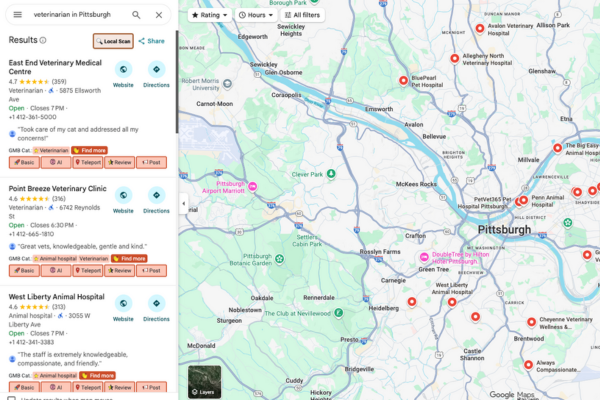
This connection between search behavior and category choice enables Google to recognize your relevance to local intent, helping your practice appear for the right patients at the right moment.
3. Select a Strong Primary Category
Think of your primary category as the title of your digital storefront. It tells Google exactly what your practice is known for and determines which searches you are most likely to appear in. Choosing this category carefully sets the direction for all your other local SEO efforts.
Your primary category should describe what your business is, not the services or equipment it provides. This clarity helps Google classify your profile correctly and connect it with the most relevant patient searches in your area.
For healthcare professionals, here’s how that looks in practice:
- A chiropractic office should use Chiropractor as the primary category.
- An animal clinic will perform best under a Veterinarian.
- A vision care practice can choose an Optometrist or an Eye Care Center, depending on its focus.
Being specific is always better than being broad. For instance, Eye Care Center communicates specialization more effectively than Clinic, helping your practice appear in niche search results.
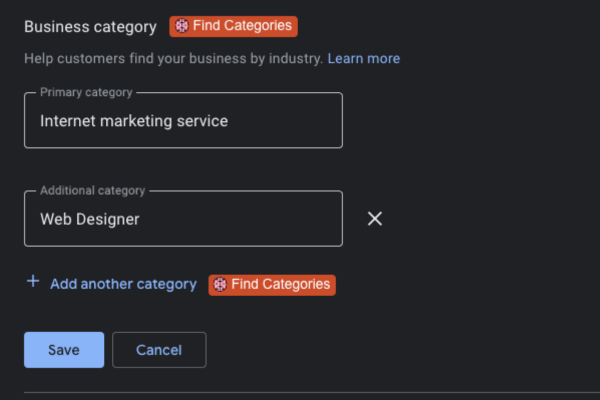
Below are examples of relevant primary categories for healthcare professionals:
- Chiropractor
- Medical Clinic
- Medical Center
- Ophthalmologist
- Ophthalmology Clinic
- Optical Instrument Repair Service
- Veterinarian
4. Add Complementary Secondary Categories
Once your primary category is in place, the next step is to refine your listing with supporting categories that capture the full scope of your services. This is where you can show Google and potential patients everything your practice offers, without losing focus on your main specialty.
Secondary categories work best when they complement your primary one. They help broaden your visibility across related searches while maintaining the relevance and accuracy of your profile. A veterinary clinic, for instance, might include Animal Hospital or Pet Vaccination Service to highlight its extended care options.
The key is balance. Adding too many categories can dilute your listing and confuse Google’s algorithm about your actual expertise. Each category should directly connect to what patients can find on your website. If a service isn’t offered in your clinic, it shouldn’t appear in your listing.
5. Check your Competitors’ Categories

Sometimes the best way to sharpen your strategy is to see what’s already working in your market. The practices that consistently appear at the top of Google Maps have likely fine-tuned their categories to match local demand. Studying them can help you uncover what Google considers most relevant for your speciality.
Begin by searching for the top-ranking clinics in your city and noting the categories they use. The ones appearing frequently across high-performing listings often point to the combinations that Google associates with patient intent in your area.
Next, use the research tools mentioned later in this guide to compare those categories with your own. For instance, if multiple veterinary clinics rank well using ‘Veterinarian’ as the main category and ‘Animal Hospital’ as a secondary, that combination may be worth testing for your profile.
The goal isn’t imitation but insight. Understanding how competitors structure their listings allows you to refine your approach and position your practice more strategically within local search.
You can also check categories manually by searching your service’s name and city and analyzing the categories displayed in the map pack for the business’s competitors. This is a practical approach if there are only a few competitors within your local area. Follow these steps to search manually:
- Go to Google Maps.
- Find your competitor’s Google Maps listing, and take note of their primary category.
- Place your mouse cursor next to their primary category.
- Right-click on their Google Maps listing.
- Choose ‘View Page Source.’
- Open the document search box by using CTRL + F or Command + F.
- Enter their primary category.
- Scroll through the highlighted text to determine their secondary categories.
How to Add or Edit GMB Categories
Follow these steps if you intend to add or edit your categories:
- Find your profile. You should sign in to the Google account associated with the profile. Check this guide from Google if you’re having difficulty locating it.
- To edit your business information, select Edit Profile on Google search. Select Edit Profile and then Business Information if you’re using Google Maps.
- Under the ‘About’ category, select Business Category. To add or edit your primary category, enter and choose the option you want to use in the Primary Category box. To add or edit secondary categories, enter and select the categories you’d like in the Additional Categories box.
- Select Save to ensure all your selections are reflected in your profile
3 Tools to Spy on Competitors’ GMB
1. Pleper
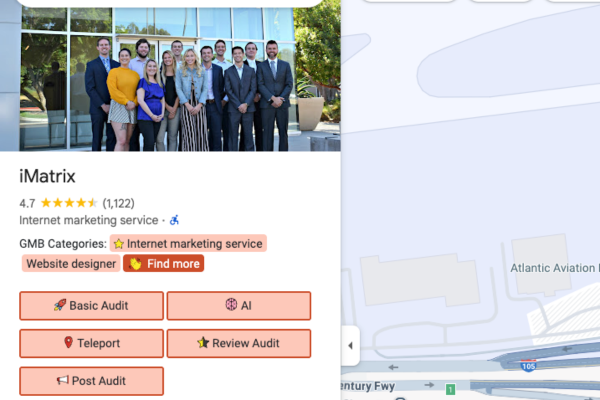
Keeping an eye on what your competitors are doing can reveal valuable insights into how top-ranked practices structure their listings. With the right tools, you can uncover which Google Business Profile categories are driving visibility for clinics similar to yours and use that data to refine your own strategy.
Pleper is one of the most effective tools for this purpose. Through its GMB Categories Tool, you can view both the primary and secondary categories used by any business profile. Simply enter a business name or paste a Google Maps URL, and Pleper displays the exact categories that define that listing.
In practice, this helps you spot consistent trends across competitors. For instance, if several top-performing veterinary clinics in Dallas use Veterinarian as their primary category along with Animal Hospital as a secondary, that pattern signals a strong combination worth testing on your own profile.
Pleper simplifies competitive research by turning what used to be guesswork into clear, actionable data you can apply directly to your local SEO strategy.
2. GMB Everywhere
GMB Everywhere is another excellent resource for quick competitor insights without leaving your browser. This browser extension overlays valuable Google Business Profile data directly on local search results, making it ideal for real-time research.
Once installed, it displays key details such as business categories, reviews, and keyword associations for every profile visible on Google Maps. This allows you to see which terms and categories your competitors are using to rank well in your area.
It’s particularly useful for healthcare professionals who want to understand local trends within their specialty. For instance, if you notice several clinics listed as Pediatric Chiropractor or Emergency Eye Care, you can evaluate whether those categories accurately match your own services and are worth including in your listing.
GMB Everywhere turns everyday searches into quick SEO audits, helping you identify what works in your niche with minimal effort.
3. GMB Crush

GMB Crush provides a deeper layer of insight into local SEO performance and competitor activity. Using its GMB analysis platform, you can uncover how often specific categories are used, compare your listing with others, and identify which combinations deliver the best visibility in your area.
What makes this tool especially valuable is its ability to audit your own Google Business Profile. You can benchmark your performance against competing clinics to see where your profile stands and what adjustments might improve your ranking.
For healthcare professionals, GMB Crush reveals data-driven patterns that can guide smarter category selection. For instance, if leading optometry clinics in your city frequently use both ‘Optometrist’ and ‘Eye Care Center,’ it suggests that this pairing resonates strongly with local search intent. Insights like these help you refine your own listing with confidence.
Optimize Your GMB to Reach More Patients
Selecting the right GMB categories is more than an SEO task; it’s a direct path to helping patients discover your practice. When your categories accurately reflect your services, Google can confidently connect you with people searching for the exact care you provide. For chiropractors, veterinarians, and eye doctors, this simple adjustment can make a measurable difference in visibility, lead quality, and patient trust.
Your profile should never remain static. Regularly reviewing your GMB categories ensures your practice stays relevant as Google updates its listings and as your services evolve. A small change, like refining a secondary category or updating your description, can keep your profile performing at its best.
At iMatrix, we help healthcare professionals strengthen their online presence through precise GMB optimization. Our team can audit your profile, refine your categories, and optimize your listings to align with the most effective local search strategies, ensuring you appear exactly where your next patient is looking.
FAQs
What does Moz say about GMB categories?
According to Moz, Google Business Profile categories are one of the most significant ranking factors for Google Maps visibility. They help Google interpret your business type, making it easier to connect your listing with relevant searches.
Moz recommends that every business choose accurate and specific GMB categories that reflect its core services. For healthcare practices such as chiropractors, veterinarians, and optometrists, this precision directly improves local visibility and patient reach.
What categories should I pick for Google Business?
Start with a primary category that defines your main service, such as Chiropractor, Veterinarian, or Optometrist. Then, add two to four secondary categories that describe supporting services, such as Animal Hospital, Physical Therapy Clinic, or Eye Care Center. Using clear and relevant Google Business Profile categories helps Google understand your specialty and show your listing to the right patients.
How to change the primary category on Google My Business?
To edit your primary category, open your Google Business Profile dashboard and select “Edit Profile.” Under “Business Information,” choose “Category,” update the selection, and click Save. Google may take a few days to process and display your new category across Maps and search results. Keeping your Google My Business listing current ensures patients always find accurate information about your practice.
How many additional business categories can you add to your profile?
You can include up to nine additional categories in addition to your primary one. It’s best to choose only those that are genuinely relevant to your services. For instance, a veterinary clinic might add ‘Animal Hospital’ or ‘Pet Vaccination Service,‘ but should avoid unrelated options. Choosing focused and accurate business profile categories strengthens your visibility and improves Google’s understanding of your expertise.
How do I determine my business category?
Begin by identifying the search phrases patients commonly use when looking for your services. Tools like Pleper and GMB Everywhere reveal the Google Business Profile categories list that top-ranking competitors use in your area. Matching these insights with your actual offerings ensures that your categories align perfectly with search intent.
How many total categories are available in Google Business Profile?
There are currently more than four thousand business profile categories available within Google Business Profile. These categories are regularly updated to reflect changing industries and new types of services. Staying informed and reviewing these updates helps healthcare professionals keep their listings optimized and relevant to local patient searches.